
Some shopping carts or system integrations may require your Merchant ID, Secret Key and Hash Type to ensure a secure connection.
A. What is MID
A merchant identification number (MID) is a unique number assigned to a merchant account to identify it throughout the course of processing the activities.
When merchants process credit card transactions over a computer network, those networks are interconnected with a credit card front-end processing centre and a back-end settlement network via a network gateway. The MID specifies the merchant, but all of the identifiers taken together will confirm each facet of the transaction for greater security.
B. How to request for your MID
1. Notify us by sending a ticket from the dashboard or guide page.
2.Upon confirmation, we will add the charges in the system.
3. You will see the charges in your dashboard (Charges > List). The charges are titled under the heading "Charge for updating login ID".
4. Proceed to make payment.
5. Notify us on the approved payment.
6. You will receive a notification e-mail regarding your MID request.
C. How can I get my Merchant ID and Secret Key?
1. Login to your dashboard.
2. Go to Menu > Settings > Profile
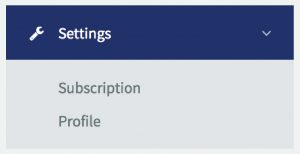
3. Your profile page will appear. Scroll down until you see a box titled “SHOPPING CART INTEGRATION LINK”.
4. Refer to the fields “Merchant ID” and “Secret Key”.
.png?width=670&height=155&name=image%20(45).png)
5. Your Secret Key can be re-generated.
D. How do I choose the right Hash Type?
When setting up your API or plugin integration, you may be asked to select a "Hash Type". This setting helps verify transaction requests and ensures a secure connection between your system and senangPay.
Available Hash Types:
You can select your "Hash Type" on the same page where you locate your "Secret Key".
.png?width=670&height=73&name=image%20(46).png)
Here’s a brief explanation of the available "Hash Types" in the settings:
-
SHA256 (Recommended) ✅
SHA256 is the more secure and preferred hash type for integrations. -
MD5 (Not Recommended) ❌
MD5 is an older hashing method and is more vulnerable to security risks. This option will be removed from the settings in future.
Always choose SHA256 unless your system provider specifically confirms otherwise.
E. Save your changes
After updating the Hash Type and/or regenerating your Secret Key, be sure to click the “Save” button on the Settings page to apply the changes.