
After migrating to the senangPay–DOKU platform, all recurring payment features are managed through FlexiBill. This guide explains how to locate your existing recurring plans, create new subscriptions, manage recurring billings, and cancel or deactivate subscriptions.
Select one of the options below to access the relevant guide.
Accessing Your Existing Recurring Payments
1. View your existing recurring plans
For merchants migrated from the senangPay legacy platform to the new senangPay–DOKU platform, all existing recurring payment links (Plans) have been successfully migrated. Your active recurring payment profiles will continue to operate as usual, so no further action is required.
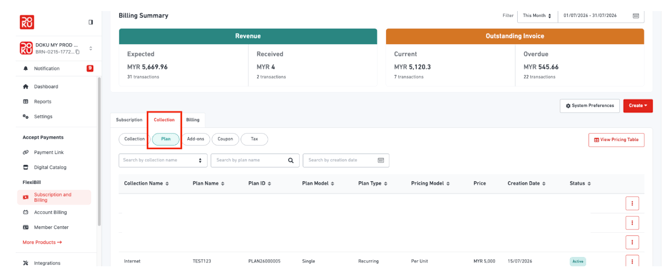
To view your recurring plans, follow the steps below:
FlexiBill → Subscription & Billing → Collection → Plan
2. View your recurring payment profiles
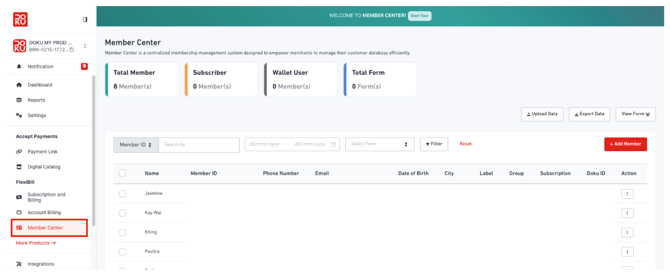
Customer recurring payment profiles can be found under:
FlexiBill → Member Center
Creating a New Subscription
Note: Before creating a subscription, you must first create both a Collection and a Plan.
Step 1: Create a Collection
Navigate to:
Subscription & Billing → Collection → Create Collection
Step 2: Create a Plan
Navigate to:
Subscription & Billing → Collection → Plan → Create Plan
Step 3: Create a Subscription
For customer-specific recurring billing:
Subscription & Billing → Subscription → Create Subscription
Managing Existing Recurring Plans
Deactivate a Recurring Plan
If you no longer wish to offer a recurring plan, you can deactivate it.
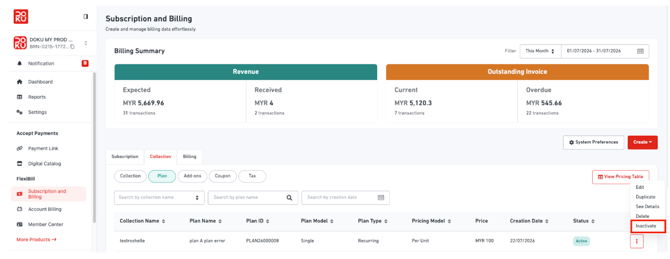
Navigate to:
Subscription & Billing → Collection → Plan
- Select the desired Plan.
- Click the ⋮ (More) menu.
- Select Inactivate.
Note: Plans with active subscriptions cannot be deleted. They can only be deactivated.
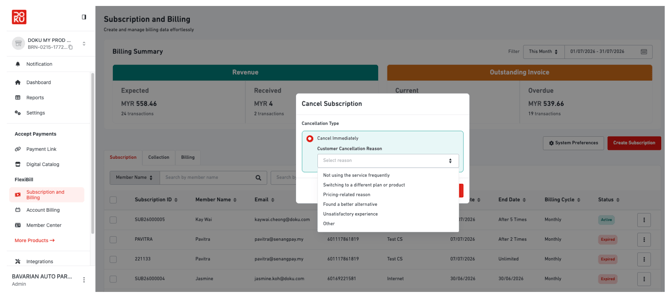
Cancel a Customer's Subscription
To stop recurring billing for a specific customer:
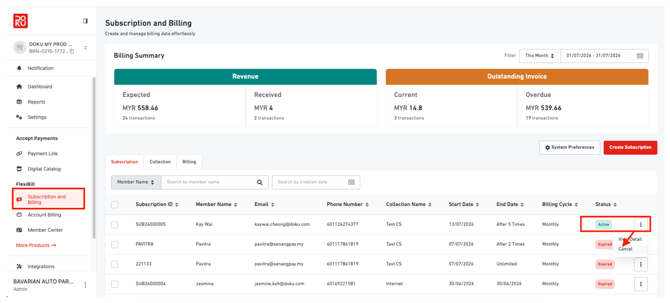
- Navigate to Subscription & Billing.
- Search using the Member Name or Subscription ID.
- Locate the active subscription.
- Click ⋮ (More).
- Select Cancel.
- Choose the cancellation reason.
- Click Confirm Cancel Subscription.
Note: Deleting customer billing records is not recommended, as deleted records are permanently removed and cannot be recovered.
Tip 💡: If you only want to stop recurring billing, we recommend cancelling the customer's subscription instead of deleting the billing record.
Managing Failed Recurring Payments
Retry a Failed Auto-Debit
If a recurring payment fails, it will not be retried automatically. You can complete the payment using one of the following methods:
-
Your customer will receive an automated email containing a secure payment link, allowing them to complete the payment manually.
-
Alternatively, you can manually retry charging the customer's saved card.
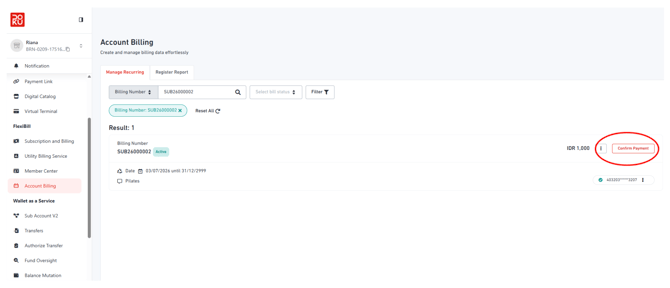
To manually retry a payment:
Navigate to:
FlexiBill → Account Billing
- Open the Manage Recurring tab.
- Search for the Billing Number.
- Click Confirm Payment.
Important Notes
- Manual retries are available for up to 30 days from the billing date.
- There is no limit to the number of manual retry attempts within this period.
- If multiple billing cycles remain unpaid, clicking Confirm Payment will combine all outstanding bills into a single charge.
Example:
If your customer has unpaid billings for June and July, clicking Confirm Payment will attempt to charge both outstanding billings together, provided the customer's card has sufficient funds.
Quick Navigation
| Task | Navigation |
|---|---|
| View recurring plans | FlexiBill → Subscription & Billing → Collection → Plan |
| View recurring payment profiles | FlexiBill → Member Center |
| Create Collection | Subscription & Billing → Collection → Create Collection |
| Create Plan | Subscription & Billing → Collection → Plan → Create Plan |
| Create Subscription | Subscription & Billing → Subscription → Create Subscription |
| Deactivate Plan | Subscription & Billing → Collection → Plan → ⋮ → Inactivate |
| Cancel Subscription | Subscription & Billing → Search Member → ⋮ → Cancel |
| Retry Failed Payment | FlexiBill → Account Billing → Manage Recurring → Confirm Payment |