
Below are the two available methods to integrate senangPay with SiteGiant:
A. Integrating SiteGiant from senangPay
B. Integrating senangPay from SiteGiant

A. Integrating SiteGiant from senangPay
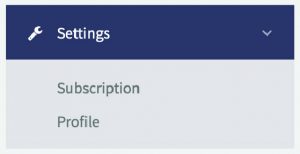
1. Login to your senangPay .Go to Menu > Settings > Profile
2. Scroll down to ‘Shopping Cart Integration Link’
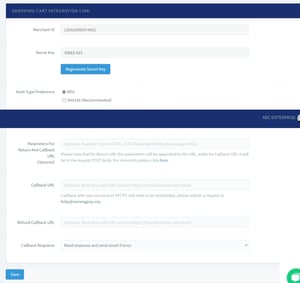
3. Choose ‘SHA256’ for Hash Type Preference

4. Insert URL below for Return URL:
https://inventoryapi2.sitegiant.io/api/v1/webstore/payments/senangpay/callback
5. Insert URL below for Callback URL:
https://inventoryapi2.sitegiant.io/api/v1/webstore/payments/senangpay/callbackBackend
6. Insert text below in parameters for Return and Callback URL:
- &status_id=[TXN_STATUS]&order_id=[ORDER_ID]&transaction_id=[TXN_REF]&msg=[MSG]&hash=[HASH]

7. In case of any breakdown during transaction process, merchants can choose to either read respond and send an email after or ignore the response to avoid getting notification from senangPay.

B. Integrating senangPay from SiteGiant
For existing SiteGiant users, please be informed that the platform has transitioned from UniCart to the new SiteGiant ERP platform. All existing merchants will be migrated to this upgraded system. We strongly recommend setting up your webstore on the ERP platform to enjoy improved performance and full feature support.
For new SiteGiant users, you will be onboarded directly to the ERP platform, as SiteGiant has discontinued support for UniCart and officially introduced ERP as their new core system.
To complete the integration from the SiteGiant side, please follow the steps provided in SiteGiant’s official documentation. View the full guide here.